Sometime in December 2025 I was looking for a school for my daughter. As part of the research phase we were invited to a school to listen to one of the teachers talking for an hour about some aspects of child psychology. I was sitting in the back and a couple of rows before me was a woman that had her laptop on her lap. As the presentation progressed I noticed the woman had the Amazon AWS console opened and then she had a chat and then some editor and she was trying to make something happen, I’m not sure what but if I had to guess she was working on some sort of integration between a LLM and Google Docs, where the LLM was hosted on AWS somehow.
Anyway, as she did her thing I noticed that she was alt-tabbing between those windows every 5 seconds. Copy and pasting between the chat window and the editor and trying to see if this “helped”. Obviously doing this, while pretending to listen to the presentation, with the laptop on your lap, didn’t sit well with me but I also thought “Oh, this is how people use LLMs still?”.
When I look at how people use LLMs at work, I think we moved past the hamster wheel phase, where we just did the back and forth, trying random stuff the agent suggested into more advanced (and yet more calm? workflows). Since I’ve been using and experimenting with LLMs heavily I often get asked what’s my current workflow. I thought it would be good to write it down as it also evolves.
I’m not sure that this is the only way to do this in December 2025 but I’m quite sure that using good LLM this way can, on most of the tasks, mean that about 80% of the code is written by the agent. That does not mean 80% of the job gets done by the agent. Coding was never the bottleneck.
I also don’t think this is particularly ground breaking and I saw many people doing similar things, I’m writing it down though, as a reference, because I still see many people doing “reactive/vibe coding” and not having the results they are after.
The workflow
OK, here’s the whole thing: my workflow as it stands in January 2026
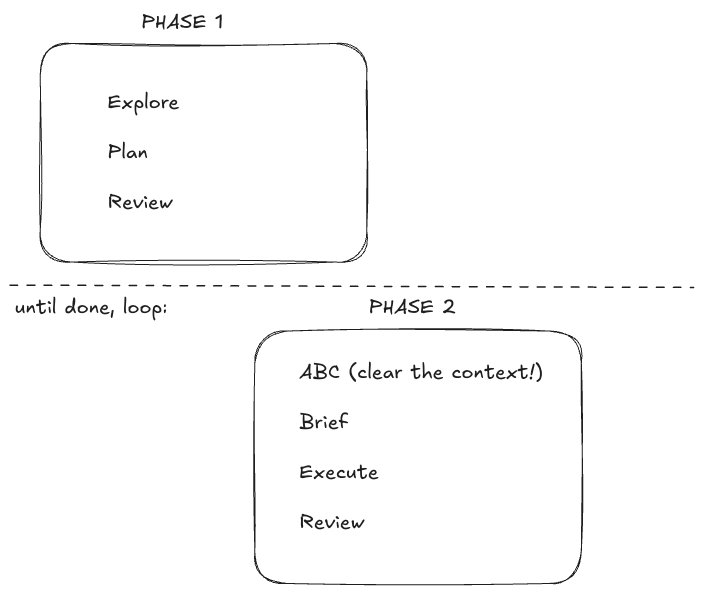
Breakdown
Phase 1
I think this is the most unintuitive part of the LLM adoption and the part where people struggle the most. The first thing you should focus on is exploration and planning so that you know what the solution will look like. Many people do something else instead, they describe the problem and wait for the agent to come up with a plan. This, in my experience, is not a reliable way of doing this. It will still produce good results from time to time, which is I guess why most people land on that approach after they are done with “chatting with the agent”.
What I do in this phase is I say something like: “Here is what we need to do …. we will be using X as a dependency (you can read the source code here ….) we also need to think about breaking the work in phases and have each phase broken down further to small todos. Prepare a markdown file with a detailed plan”
Once that is done I read the plan. Sometimes this takes a long time, this is where I get to be in the zone, reviewing what the agent thinks needs to be done. But for larger task I seldom finish here, I save the file, clear the context and tell the agent something like: “Read the @Plan.md file. Let’s talk about Phase Y, try coming up with a more detailed implementation strategy, how would we test this code? You can add those details to @PLAN.md file. Also include code snippets, test scenario names you think might be useful”.
After I’m done going through all the phases and am more or less sure this is what we want to build I might make some additional changes (like add git branch names to each phase or some acceptance criteria, like “* make sure to run the server locally with ./gradlew bootRun and use curl to test the API response” )
Phase 2
By now we have the document with very detailed description of the thing we want to achieve. Depending on how exactly we broke down the implementation this can go a couple of different ways, for example sometimes a change needs to be added in a couple of services and the work can be done concurrently, other times it has to be more linear, step-by-step. But the idea is quite simple, you clear the context, you tell the agent something like: “Read @PLAN.md and work on the next phase, when done update @PLAN.md with our progress”, when it does finish those changes, you review them - hopefully those are small diffs - and you create a new commit. That’s it - repeat until done.
Obviously different things might happen here. You might find that the direction you started on is completely wrong, for example. In my experience this is a nice benefit of having the plan as a result of Phase1. What you can do is clear the context, and tell the agent “We produced PLAN.md but it has the following downside… we need to address this by exploring ….. "
And that’s it. I think the big idea here is nicely described by this graph
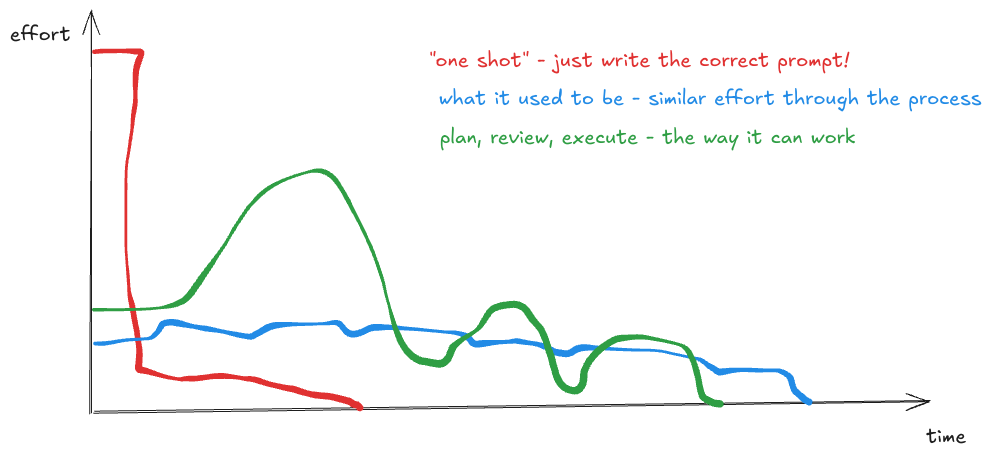 The effort is different throughout the process but you have to spend more energy upfront doing the planning.
Notes
- I used to always call my files PLAN.md and keep them in the root of the repo. Now I have them in a single folder and I call them ~/code/plans/PLAN_feature_x.md this makes it easier when you have a multi repo feature, but also you can keep them around for later
- The most important thing to keep in mind here is that the context is very valuable. It’s not only about the size of the thing you put inside but mostly about the quality. That’s why the most important rule for me is ABC, Always Be Clearing the context, when you are done with a small bit of work commit and clear. When you go the wrong way /clear and start again. If you need to persist a piece of knowledge from a session, add it to PLAN.md
- I don’t use MCPs a lot and in general I feel that they are dangerous as they go against the point with keeping the context clear. I sometimes use skills and probably will explore those further.
- Some tools, like Cursor, have a really nice planning mode, opencode as well can track todos really well. In general I think that maybe planning modes will get better at this but right now I prefer this approach where my plan is just a plain text file and I can read it and make edits any time I want.